
Point of Sale
The ASPOS till on phone, tablet and Windows, which keeps selling when the internet drops out.
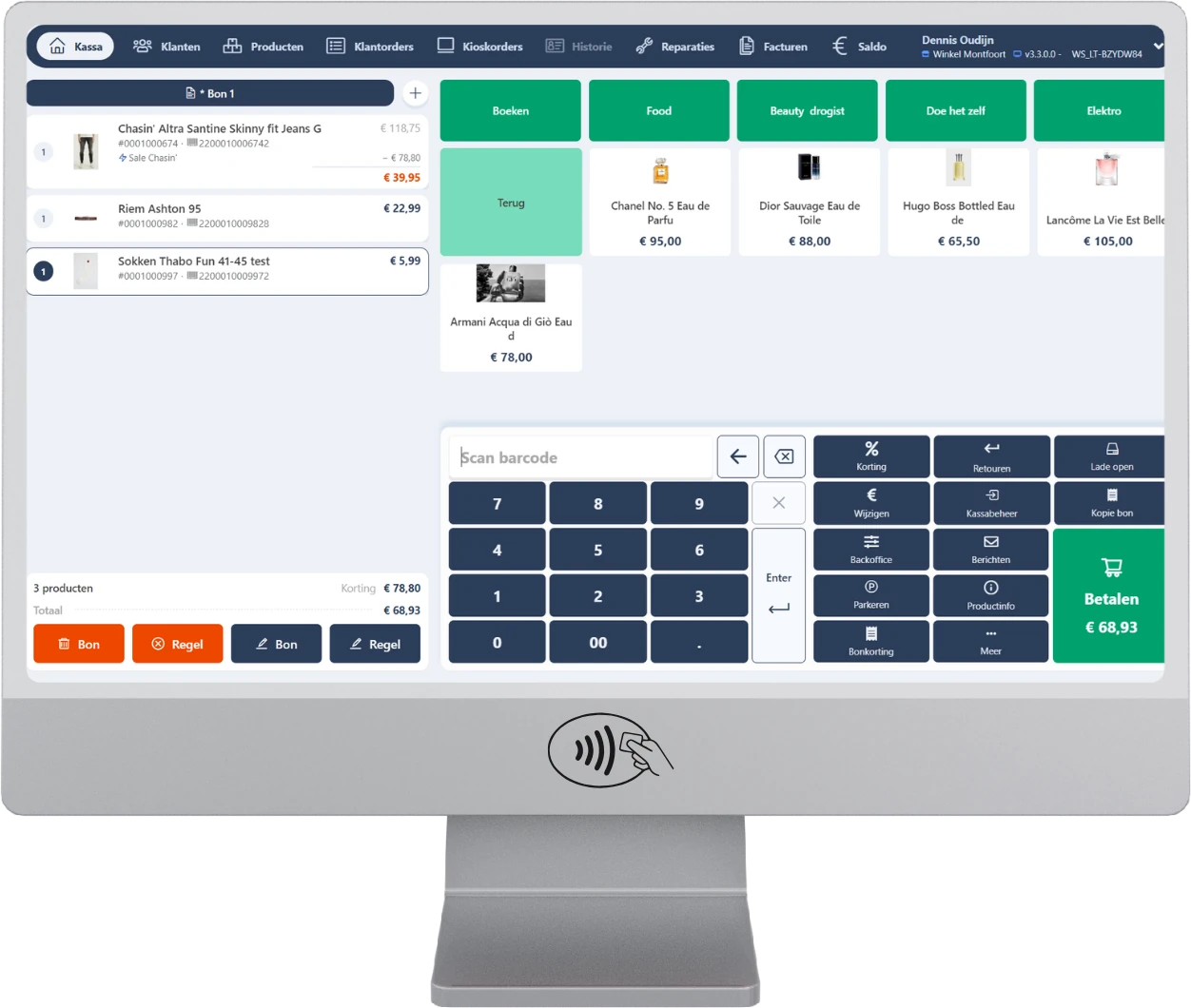
About Point of Sale
Checkout at the counter, on the shop floor or by the fitting rooms.
POSNxt is the ASPOS till, on the device that suits your store: an Android or iOS phone, a tablet or a Windows touchscreen till. Your staff take payment at the counter, on the shop floor or by the fitting rooms, with the same items, prices, promotions and customer data everywhere.
POSNxt is fully connected to ASPOS Backoffice. You manage till buttons, receipt layouts, payment methods, permissions and till messages centrally; sales, stock and customer orders are instantly visible in all stores. If the connection drops, you simply keep selling. The till calculates prices and promotions itself, you take cash payments and receipts are sent as soon as you are back online. POSNxt and ASPOS Backoffice carry the Dutch Trusted Checkout System quality mark (Keurmerk Betrouwbaar Afrekensysteem).
POSNxt is continuously developed with feedback from the daily practice of more than 4,500 stores and 7,000 tills working with ASPOS (as of 1 January 2026).
Key features
Everything that happens at the counter.
- Fast checkout: with scanner, camera or till buttons; up to four receipts open at once, park receipts and retrieve them on another till
- Item information: photos and stock in this and other stores; size/colour items, bundled items, custom items, open price and weighed items
- Promotions and discounts: mix & match, tiered pricing, set prices, receipt discount and customer discount calculated automatically; manual discount with reason and permission check
- Customers and loyalty: find and register customers, purchase history across all stores, redeem loyalty points, convert a customer into a loyalty member, price lists per customer
- Customer orders: order, quote, deliver or collect at any store, down payment and checkout, and pay for kiosk orders
- Repairs: intake with warranty check, loan item, photos and price approval, with status and labels
- Returns: from the receipt, from customer history or without a receipt, with return reason and refund via the original payment method or with a credit note
- Invoices and on account: pay outstanding invoices at the till, sell on account with credit check
- Cash management: book money in or out of the till, open the drawer with a reason and count the till
- Receipts: print, on A4 or by email; look up transactions and create a copy receipt
- Employees: log in with password, PIN or card, switch users quickly, automatic lock and around 45 configurable permissions
- Keep selling offline: local price and promotion calculation and cash payment; receipts are sent automatically once the connection is restored
- Food service: eat in or take away, with kitchen ticket
- Tailored to your device: separate phone and tablet views, left-handed mode, on-screen keyboard for touchscreens, age check (NIX18) and item alerts
- Five languages: Dutch, English, German, French and Spanish
Integrations
Works with the systems you already use.
Integrated out of the box, and extendable with your own systems through the open ASPOS API.
Payments
Adyen, Buckaroo, CCV, Mollie, MultiSafepay, Pay.nl and Worldline
Tap to Pay on Android
Take payment on the phone itself with Adyen Tap to Pay, CCV SoftPOS or Buckaroo SoftPOS
Gift cards
Intersolve, Xafax, ICP, FashionCheque, CinemaCard, TCS and Piggy; sell and redeem ASPOS e-vouchers
Loyalty
ASPOS Loyalty and Piggy (rewards and gift cards)
Meal and eco vouchers
Belgium
Fiscal
Certified for the Netherlands, Belgium, Germany, Luxembourg and France, among others
Deposit return and returnable packaging
Integration with RVM and Tomra systems
Hardware
Epson network receipt printers and cash drawer, A4 printers, Zebra label printers, built-in Zebra and Datalogic scanners, USB scanners and the phone or tablet camera
Combine with
Everything on the same platform.
Self Checkout
Customers scan and pay themselves, while one employee oversees several self-checkouts.
Learn moreRepair & service
Repairs from intake to collection in one system, at the counter and at the customer’s home.
Learn moreLoyalty & vouchering
Engage customers with loyalty points, personal offers and vouchers, in every store and online.
Learn moreFAQ
Frequently asked questions
Does the ASPOS POS also work offline?
Yes. If the connection drops, you simply keep selling: the POS (POSNxt) calculates prices and promotions itself and you take cash payments. Receipts are sent automatically as soon as you are back online.
Which devices does the ASPOS POS (POSNxt) run on?
POSNxt runs on an Android or iOS phone, a tablet or a Windows touchscreen POS. You choose the device that suits your store, and everywhere you use the same items, prices, promotions and customer data. POS buttons, receipt layouts, payment methods and permissions are managed centrally in ASPOS Backoffice.
Which payment methods and gift cards does the ASPOS POS system support?
As standard, the POS is integrated with Adyen, Buckaroo, CCV, Mollie, MultiSafepay, Pay.nl and Worldline. On Android you can take payments on the phone itself with Adyen Tap to Pay, CCV SoftPOS or Buckaroo SoftPOS. For gift cards, the POS works with Intersolve, Xafax, ICP, FashionCheque, CinemaCard, TCS and Piggy, among others, and you can sell and redeem ASPOS e-vouchers.
Is the ASPOS POS certified?
POSNxt and ASPOS Backoffice carry the Dutch Keurmerk Betrouwbaar Afrekensysteem (certified reliable checkout system). The POS is fiscally certified for the Netherlands, Belgium, Germany, Luxembourg and France, among others.
Which payment terminals can I use with the ASPOS POS?
You use the payment terminals supplied by the integrated payment providers, such as Adyen, CCV and Worldline. All terminals they supply are supported.
Do I need a network printer for the ASPOS POS?
No. The POS also works with a regular cash drawer and receipt printer; a network printer is not required.
See Point of Sale in action.
Book a demo and discover what it means for your stores.